
AstroNav Mission Control
AstroNav Mission Control (AstroNav MC) is an offline desktop application for working with an AstroNav Nano over USB. It discovers the Nano, checks for firmware updates, reads device information, edits supported settings, imports flight logs, and replays recorded telemetry.
Choose a task
Section titled “Choose a task”- Installation - download AstroNav MC, install it, and connect an AstroNav Nano.
- Device settings - review diagnostics and safely edit flight configuration.
- Flight logs readout - read device logs, import them locally, export CSV files, and manage the archive.
- Mission replay - replay a flight with synchronized charts, telemetry, and the vehicle-attitude view.
- Data overlay - sync a launch video with a flight log and export it with a telemetry overlay.
Basic workflow
Section titled “Basic workflow”- Install AstroNav MC and connect the Nano in USB storage mode.
- If AstroNav MC offers a firmware update, select Install and wait for the device to restart.
- Check the device health and identity in the application overview.
- Review device settings before a flight, then select Eject in the top bar so the Nano applies them.
- Preserve and inspect flights using Flight logs readout.
- Open a flight in Mission replay to review phases, charts, and recorded values.
- Optionally, combine the flight with your launch video in Data overlay.
Application at a glance
Section titled “Application at a glance”The application has a sidebar for Overview, Settings, and Flights, plus a top bar showing the current section, connection status and the Eject button. Most pages have a help icon next to the title that opens the matching wiki page. With a device selected, the overview can show its model, serial number, mount label, health, power source, runtime mode, flight state, and recorded-flight summary.
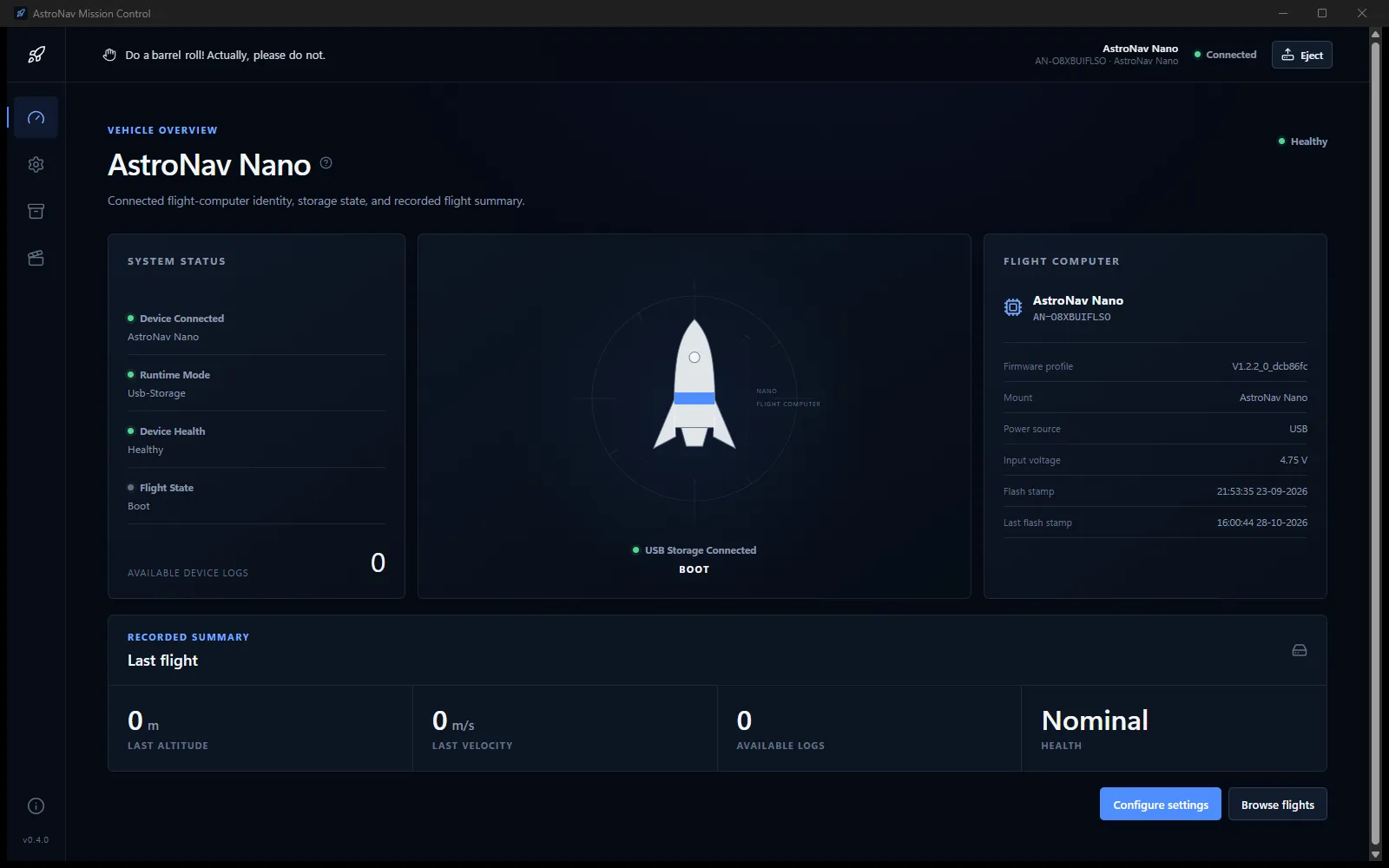
The pages in this section follow the same flow:
| Page | Use it when you want to… |
|---|---|
| Installation | Set up the software or resolve a connection problem |
| Firmware update | Update the flight controller automatically or manually |
| Device settings | Configure flight estimation, launch detection, or pyro behavior |
| Flight logs readout | Find, preserve, delete, or export recorded flights |
| Mission replay | Understand what happened during a recorded flight |
| Data overlay | Export your launch video with flight data on top |
Important limitations
Section titled “Important limitations”AstroNav MC currently supports AstroNav Nano workflows only. It does not support AstroNav MK1 devices, serial communication, live flight monitoring, GPS or geographic trajectory reconstruction, cloud services, OpenRocket integration, or opening the device’s Website.url shortcut.